
Thumb Sleeves & Mobile Triggers for BGMI: Do They Help? (Budget Gear Guide 2026)
TL;DR: Thumb sleeves solve a real problem — sweaty thumbs sticking to the screen in Indian heat — and they’re cheap enough to just try. Mobile triggers (clip-on L1/R1 buttons) mainly help non-gyro players who’ve run out of fingers for their layout, but need 1–2 weeks of relearning. Neither is magic: sleeves fix friction, triggers add buttons, and neither replaces practice. Buy cheap, replace often, skip the “gaming” markup.
Table of Contents
- The Real Problem: Sweat, Not Your Phone
- What Thumb Sleeves Actually Do
- How to Pick Thumb Sleeves
- Price Reality in ₹
- Mobile Triggers: Who Actually Benefits?
- Performance vs Placebo: An Honest Take
- Hygiene and Replacement
- What NOT to Buy
- FAQs
Every Indian BGMI player knows the moment: May, fan off for the mic, twenty minutes into ranked your thumbs stick to the screen. Aim drags, the joystick stutters, you lose a winnable fight — not from lack of skill, but sweat. Here’s the honest truth about the two gadgets claiming to fix it.
The Real Problem: Sweat, Not Your Phone
The biggest hardware disadvantage for Indian mobile gamers isn’t a 60Hz screen or a mid-range chip — it’s humidity. Sweat raises friction between thumb and glass, making every swipe jerky. Your aim doesn’t worsen because you’re bad; it worsens because your thumb can’t glide.
That’s why sleeves help more in India than almost anywhere else. A player in an air-conditioned room in December barely needs them. A player in Chennai in June, phone heating up after three matches, feels the difference in game one. If your aim specifically collapses in long sessions or hot weather, friction is your problem — and it’s physics, not skill.
What Thumb Sleeves Actually Do
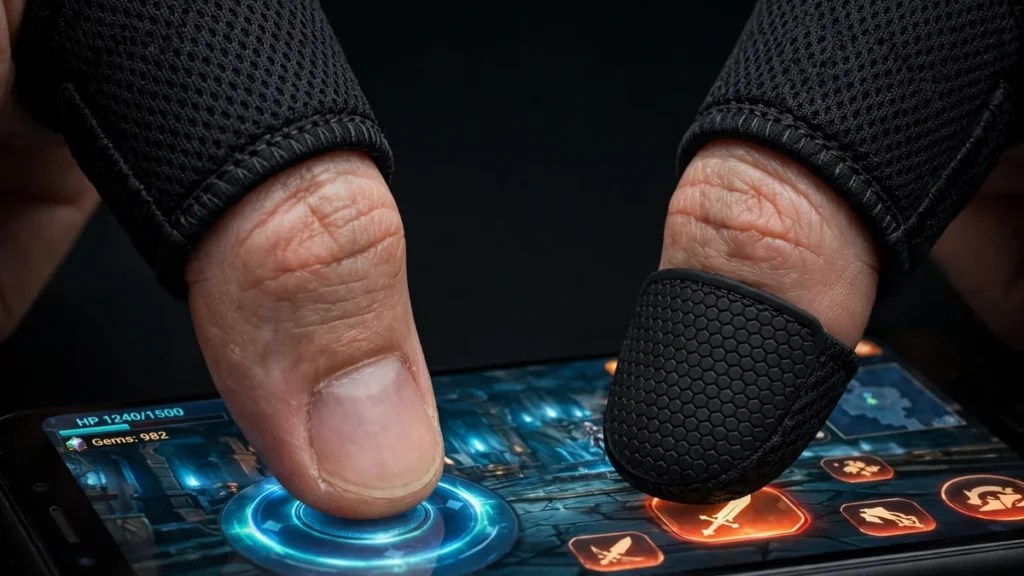
A thumb sleeve is a tiny fabric tube for your gaming thumbs — no electronics, no magic. It does three things:
- Consistent glide. The fabric slides the same whether hands are dry or sweaty, so your muscle memory finally gets consistent input.
- Smoother flicks. Fast turns and scope adjustments stop sticking mid-swipe.
- Less skin irritation during marathon sessions.
What they don’t do: improve aim, fix sensitivity, or speed reactions. They remove an obstacle — like running shoes, which don’t make you fast but stop the ground from hurting so training counts.
How to Pick the Right Thumb Sleeves for BGMI
What actually matters:
- Material. Thin synthetic blends glide smoother and handle sweat better than cotton-spandex mixes, which feel softer but dampen faster. For BGMI’s fast swipes, synthetics win.
- Fit. Snug, not tight. Loose sleeves bunch at the knuckle — worse than none. Too tight cuts circulation in long sessions. Most come in one or two sizes; if between sizes, size down (they stretch slightly with use).
- Seams. Thin, flat stitching. Thick seams catch on the screen edge during big swipes — the detail separating decent sleeves from annoying ones.
- Washability. You’ll sweat through them, so they must survive hand-washing. Good ones last dozens of washes; if one dies after two, it was too cheap even for sleeves.
- Pack size. They come in packs (commonly 4–10) — you lose them, they wear thin, one tears. Bigger packs are almost always better value.
Give them a week before judging. Hour one feels like gloves; by day three most players forget they’re wearing them — exactly the point.
Thumb Sleeves and Triggers: Price Reality in India
This category is full of markup nonsense, so let’s be blunt. Thumb sleeves are fabric tubes — cheap to make, and you should pay accordingly.
- Thumb sleeves: A pack typically runs from the low double digits to around a hundred rupees. Anything in that band from a reasonably rated seller is fine — several hundred for “pro esports” sleeves means you’re buying the word “pro,” not better fabric.
- Mobile triggers (clip-on pairs): Generally a few hundred rupees for basic mechanical ones. Fancier designs cost more, but the mechanism is simple — a button tapping your screen — so expensive doesn’t mean better.
This is budget gear: if sleeves plus triggers cross the cost of a couple of pizzas, you’re overpaying. The gap between a ₹60 pack and a ₹400 pack is negligible; between sleeves and no sleeves in summer, huge.
Mobile Triggers: Who Actually Benefits?
Clip-on triggers sit on your phone’s top edge and give you physical L1/R1-style buttons — usually fire and aim/scope — via a conductive pad that taps the screen.
Who benefits:
- Non-gyro players on complex layouts. On a 4-finger claw without gyroscope, every finger is booked. Triggers let you fire without lifting your aim thumb — a genuine ergonomic win.
- Players with strained layouts. If your fire button forces an awkward thumb stretch, a trigger puts “fire” somewhere natural.
Honest downsides:
- Relearning time. Fire-button muscle memory is deeply wired — expect 1–2 weeks of worse play. Most quitters decide on day three.
- Bulk and slippage. They thicken the phone, fight with cases, and cheap ones misalign mid-match.
- Screen coverage. Pads sit on screen edges — awkward on curved displays or tight UI layouts.
- Gyro players need them less — with gyro aiming, thumbs are already free enough.
Triggers are a layout tool, not a skill tool — if your layout works, they solve a problem you don’t have.
Performance vs Placebo: An Honest Take
Real: Sleeves fix sweat friction — physics, not placebo. Consistent glide means consistent muscle memory. If your aim degrades in long sessions, sleeves measurably help.
Real but conditional: Triggers add input options — transformative for finger-limited 2-finger players, a paperweight for comfortable 4-finger gyro users.
Placebo: Anything promising “faster reactions” or “pro accuracy.” No clip-on speeds your brain; gear removes obstacles so existing skill shows consistently.
Buy gear to remove obstacles, not gain superpowers.
Hygiene and Replacement Tips for Thumb Sleeves
Unsexy but important — worn gear quietly gets worse:
- Wash regularly. Hand-wash with mild soap, air dry — sweat-soaked sleeves lose glide and smell.
- Replace when loose or thin. Stretched sleeves bunch at the knuckle and catch on swipes — worse than none. Packs are cheap; rotate without sentiment.
- Don’t share sleeves. Skin contact + sweat = personal item. Full stop.
- Check trigger alignment weekly. Clip-ons shift; missed taps are usually alignment. Wipe pads with a dry cloth — dust kills responsiveness.
- Wipe your screen too — sleeves glide best on clean glass; a microfiber wipe beats any “premium” sleeve on a greasy screen.
Thumb Sleeves and Triggers You Should NOT Buy
- Overpriced “esports pro” sleeves. 5–10x the normal price for branding and packaging? Walk away. Fabric is fabric.
- Sleeves with rubber grip dots. Texture means inconsistent friction — the exact problem you’re solving. Smooth only.
- Triggers needing Bluetooth, apps, or config changes. Mechanical clip-ons just work. Anything requiring pairing or changing game settings adds failure points — and anything automating inputs (macros, auto-fire) risks your account. If a gadget plays for you, it’s a ban waiting to happen.
- Cooling fans sold as aim improvers. Coolers help thermal throttling in long sessions — a real but minor factor. They’re a heat tool, not an aim tool.
- Anything promising “auto-aim.” Not gear — cheating. Instant account risk, and it ruins the game for others.
Conclusion
Thumb sleeves and mobile triggers solve real problems — sweat and grip — but they are not magic. Buy based on the honest guidance above, skip the overpriced gimmicks, and replace your sleeves before they wear out.
FAQs
Do thumb sleeves really make a difference?
For sweat friction, yes. They won’t fix game sense or recoil control, but they make thumb movement consistent in heat and long sessions — and consistency is what muscle memory needs. Most players feel it within a few summer games.
How long do thumb sleeves last?
A few weeks of regular use before stretching or wearing thin — hence packs. Rotate them; a worn sleeve is worse than none.
Are mobile triggers allowed? Will I get banned?
Basic mechanical clip-ons just physically tap your screen — no game modification, no automation. What’s bannable is software-side cheating: mods, scripts, auto-fire tools. If a gadget connects to the game or automates inputs, stay away.
2-finger, 3-finger or 4-finger — do I need triggers?
Depends on your layout, not the number. Triggers help most when you’re out of fingers — 2-finger players wanting a dedicated fire button, or 4-finger non-gyro players freeing an index finger. Comfortable with your layout? You don’t need them.
Can I just use a fan or AC instead of sleeves?
Cool air helps, but you can’t carry AC to a friend’s house, a tournament, or a power cut. Sleeves work everywhere, cost almost nothing, and don’t depend on weather or electricity. Many players use both.
What’s the single best first gear purchase?
A basic pack of smooth thumb sleeves. Cheapest, helps the most players, near-zero learning curve, and can’t break your layout. Everything else is situational; sleeves are universal.
Disclaimer: BuzzGamers is an independent, fan-run website and is not affiliated with or endorsed by Krafton, Inc. or Battlegrounds Mobile India. All game names, marks and images belong to their respective owners.